Portfolio

Showing posts with label Analog. Show all posts

Tuesday, July 18, 2017

How to Make Meringue: Cascode Edition!

Have you ever made meringues? I'm a big fan of pavlova (AKA meringue cake) but unfortunately for me, pavlova isn't exactly popular in CA. Hence, I've gone through several meringue recipes. They all differ drastically from how to introduce sugar, what speed to beat, what temp to bake (and the duration...sigh), etc. And of course, *everyone* claims their recipe is "the best and most fool-proof" (hah!). I've come to the conclusion that everyone has deeply ingrained, arbitrary superstitions regarding meringue (then again, I still believe in my lucky exam pencil, so who am I to judge?). All jokes aside, the only thing that really matters is the beaten egg mixture doesn't slip out of the bowl when flipped turned upside down...(at least that's my fool-proof superstition 😆).

Likewise, the methodology behind the construction of feedback diagrams is as idiosyncratic (if not more so) than meringue. Everyone has their own peculiar feedback recipe and it's all really the same thing. Granted, I do prefer the Driving-Point-Impedance (DPI), short-circuit current. signal-flow graph (SFG) method outlined by Agustin Ochoa, but again this is more of a matter of personal taste. I specifically like Ochoa's process in that it naturally gives additional circuit information (ex: output impedance, example later in post).  

Let's take a very familiar circuit for demonstration. What's more beloved than the reliable cascode (Fig 1)? 

Fig. 1 - Cascode


Fig. 2 - Cascode Small-Signal Model
Let's start with the tried and true small signal model (Fig. 2) and algebra method. This gives us our voltage gain (Eqn. 1)


Eqn. 1 (meh it's a set, oh well)

If we're judging methodologies in terms of speed and simplicity, the normal algebra method wins (for this specific case). It's easy, but it may not give other information (which is fine if all that's asked is voltage gain). 

Now let's look at Ochoa's method (I super recommend his book).

First, we'll grab the short circuit currents. We set all potential voltage nodes as "independent voltage sources" and short the voltage source of interest (we are getting the short-circuit current after all). Then we grab the DPI by shorting all the other voltage sources and opening our node of interest (hence the driving point impedance part). Note: this all works because for each node we're grabbing: 1) short-circuit current *and* 2) "open circuit" (really driving point) impedance which gives us a voltage for each node (hence the whole fake independent voltage source for each node). We then methodically move through all the nodes until we have hit the output node. Think of it as superposition mayhem. For more info, I strongly suggest Ochoa's book mentioned above. 

Now we look at our first node: $v_{x}$. For our short circuit current, we set $v_{out}$ as a source, then short $v_{x}$ (Fig. 3). This gives us the following short circuit current (Eqn. 2, note we short across $r_{o2}$, hence no contribution). Also no contribution from $g_{m1}$ because we've shorted $v_{x}$. 
Fig. 3
Eqn. 2
For DPI (we are searching for "$Z_{x}$"), we short all sources and open our node of interest. This leaves $v_{x}$ open while all the other voltage sources are shorted (Fig. 4). $g_{m2}$ is open because the input voltage is shorted. This reduces to $g_{m1}$ and $r_{o1}$ and $r_{o2}$ all in parallel, leaving us the DPI of Eqn. 3.

Fig. 4
Eqn. 3
For $v_{out}$ short-circuit current, we set $v_{x}$ as an independent source and short $v_{out}$ (Fig. 5). The short circuit current is equal to the contribution from $\left( g_{m1}+g_{o1} \right) v_{x}$. 
Fig. 5

Eqn. 4
The DPI for $v_{out}$ is simply $r_{o1}$ since $r_{o2}$ is shorted (from $v_{x}$) (Eqn. 5). Both $g_{m1}$ and $g_{m2}$ are open since both $v_{in}$ and $v_{x}$ are shorted to GND (Fig. 6). 

Fig. 6
Eqn. 5
Now that we have a complete set of short-circuit and DPI equations, let's put together our feedback graph. Combing equations 2 through 5, we get the following.

Fig. 7

Eqn. 6

Hooray, we get our voltage gain (Eqn. 6)!!!

Now a few interesting things to note from Fig. 7. First off, we actually get the same voltage gain as algebra method because we have positive feedback from the output voltage (Fig. 7). As we look back on the original small signal model, this makes some sense. Resistors are bi-directional, hence there is some "backwards-leaking" current from $v_{out}$ to the $v_{x}$ node (which ends up mingling with the $-g_{m2}*v_{in}$). Second off, we can calculate output resistance easily from Fig. 7. In fact, Fig. 7's output impedance matches the algebraic solution (Eqn. 7 derived from Fig. 7 is the same result as the traditional algebra).
Eqn. 7
The third cool part is let's say there's some voltage noise coupling to $v_{x}$ from another trace in the circuit. With the overall block diagram, we can see how the coupled noise to $v_{x}$ would look on the output by calculating $\frac { v_{ out } }{ v_{ x } }$. We could also introduce current noise sources at the various short-circuit currents to simulate shot noise. Heck, you can add noise sources where ever desired and see the effect on the output. The real magic is the feedback diagram enables noise modeling.

Equally important (which I haven't listed here) is if this exercise is re-done with reactive components (mostly caps), it should become obvious which caps affect bandwidth/stability the most.

Now...there is a third method to calculate voltage gain via *another* feedback graph technique. I haven't found a formal name for this technique other than "‘Fake Label’ Circuit-Analysis Trick" from Ultra Low Power Bioelectronics.

I don't particularly like this method because the diagram produced isn't guaranteed to carry more information other than the *specific* output/input requested. Why? Ochoa's method intentionally dissects the circuit into short-circuit current, driving point impedance, and voltage sub-blocks ($i_{sc}*DPI = v_{node}$). This is great in that we can easily get impedance, $\frac { i_{ out } }{ i_{ in } }$, and $\frac { v_{ out } }{ v_{ in } }$ naturally by looking at the diagram because it's already intentionally broken into current, impedance, voltage. The "Fake Label" method instead takes all the dependent sources, makes them fake independent sources, and re-builds a diagram by turning each source on one at a time. While the overall transfer function (as in output/input only) might be accurate, the "Fake Label" feedback diagram won't be in current to impedance to voltage blocks, so information from intermediate nodes within the overall diagram may not be accurate/present. Thus with "Fake Label", you end up drawing different diagrams for different specified transfer functions (like the examples below with voltage gain and output impedance).

However, the useful part of "Fake Label" is that it's more simple than DPI/short-circuit current - we're only looking at one source at a time. For larger circuits, I can see using "Fake Label" over Ochoa's.

For example, let's look at "Fake Label" for cascode's voltage gain.

First, we would turn all the $g_{m}$ dependent sources into independent current sources. Our control variables will be $v_{x}$ and $v_{out}$.
Fig. 8

Now we step through turning on one source at a time.

If $v_{in}$ were on but the other two current sources off (i.e. open), $v_{x}$ and $v_{out}$ see no contribution. Hence nothing to write about here.

If $g_{m2}$ (called $i_{2}$) were on and $v_{in}$ were off (i.e. short to ground) while $g_{m1}$ were off (open), then we see the following.
Fig. 9

Eqn. 8

If $g_{m1}$ (called $i_{1}$) were on and $v_{in}$ were off and while $g_{m2}$ were off, then we see the following. 

Fig. 10
Eqn. 9


Eqns 8-9 create Fig. 11 (which has the correct voltage gain). However, this diagram doesn't describe the output impedance (and I wouldn't use Fig. 11's $\frac { v_{ out } }{ v_{ x } }$ either since the intermediate nodes aren't meticulously split into current and DPI). Again, we haven't re-conditioned the system into short-circuit current, driving point impedance, and voltage sub-blocks (a sub-block for each node) but rather look at the aggregate contribution to a node via several "independent" sources. Because the processes are different (which leads to different equations as well), we get different block diagrams. 

Fig. 11

This means that if we want output impedance (via "Fake Label"), we'll have to construct another diagram... Sources will be $v_{t}$ (previously output voltage) and $i_{1}$. $i_{2}$ disappears because the input is grounded in order to calculate output impedance. Control variables are $i_{t}$ and $v_{x}$.

Fig. 12

If $i_{1}$ is on and $v_{t}$ is off, then we see the following.

Fig. 13
Eqn. 10


If $v_{t}$ is on and $i_{1}$ is off, then we see the following. 
Fig. 14

Eqn. 11

Putting this all this together leads to the following (Fig. 15). The overall transfer function is equal to the inverse of the output impedance!

Fig. 15
As we've seen, there's a lot of ways bake meringue. In terms of pure output/input transfer function, they all end up with the same result. Depending on what you're looking for, one way may be better than others (Table 1). Again, it's a matter of personal taste (along with objective), but I would definitely take a look at both Feedback in Analog Circuits by Agustin Ochoa and Ultra Low Power Bioelectronics by Rahul Sarpeshkar if this is interesting. Seems like classical feedback is somewhat of a dying art nowadays (boo), but the intuition is still fun and it's always good to expand one's palette, even if it all makes the same meringue. Hah!

Table. 1


Monday, December 31, 2012

I'm a Beardy-Weirdy?

S'up guys,

This was my year of being old and cranky (senior fall), so I decided to become a beardy-weirdy (analog-esque EE). For some reason, I always associated analog people with old engineers probably because I once saw a picture of Bob Pease and assumed all analog-ers looked like this.

"My favorite programming language is ... solder"  
Unfortunately, this gave me the impression that if I were to become an analog EE, all the people in my life would be sarcastic, scraggy Santa Clauses...(someone is going to kill me for this comment so here's my pre-emptive apology). While I'm sure Bob Pease was a creative man and had a dry sense of humor, you could imagine how this could put off a naive, girly-as-hell EE. In no way am I saying Bob Pease wasn't freaking baller nor am I saying there are no female and/or young analogs. Just not many...

(Btws, this was before I realized that Prof Roberge used to look like James Bond back in the day, so clearly there was evidence of well-dressed analog people)

Regardless, I decided to brave the challenge, so I signed myself up for MIT's 6.301 (Solid State Circuits). Glad I did, because that class was awesome!

First off, my main gripe with MIT undergraduate classes is that they aren't very "design-y". 6.301 is a grad class, but I wish more of my undergrad had been like it. For the most part, I felt like I was always learning fancier and fancier math, but never how to create with it. , In my opinion, a lot of the 6-1 (EE) curriculum consists of churning math out. It's basically the opposite of creative. You learn a protocol, you apply that protocol to constrained examples in homework and tests, then you're done. What I hate about this is that you're not given an opportunity to be particularly creative. You don't jump and apply concepts from one field to another (well I sort of did in 6.021 (BioEE) - fun class), but for the most part, you don't really even apply it outside of that week's lecture. This is why I've built things outside of class, because I couldn't stand this system. I've always thought the best way to prove myself that I've learned something is to use it. I'm afraid most undergraduates aren't taught to be innovative. That scares me! We might graduate more and more engineers, but we'll only make limited progress if we can't be creative. People must to learn to imagine what does not yet exist...although I admit it's a daunting task.

6.301 is quite different! Instead, you learn a bunch of design ideas for why certain topologies are good/bad, what are trade-offs between them, etc. Sometimes we would go through a specific design in a series of lectures and see how a designer might conclude with that circuit through various estimations/intuition. There are also these excellent course notes by Kent Lundberg which are super awesome. During the course, you get to run wild and design three circuits from scratch.

Anyway, long rant short, I wanted to summarize the things I designed for 6.301. I really loved this class :D


Lab 1:

Oh man, my first circuit with BJTs that didn't catch on fire! Previously, anything I ever built with BJTs somehow, at least once, caught on fire. Don't ask why. Too embarrassing :X I did always fix them though. This is also my least elegant circuit probably because it was my first. Everyone's gotta start out somewhere...
I'm derpy.

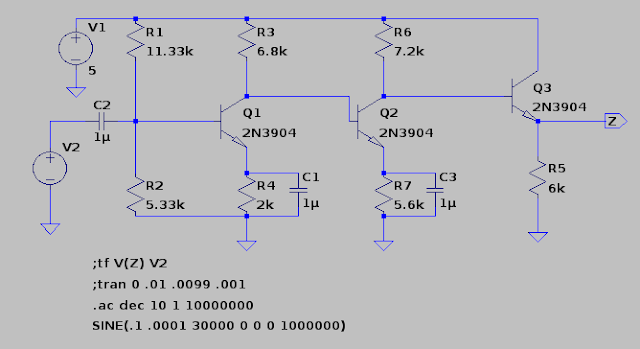
The goal of this lab was to make a 3-stage amplifier that met these specs:

We were learning about common-emitter amplifiers, and so the smart thing to do was put caps on the emitters to make the AC voltage gains super high. It's still nice to have emitter resistors to set Ic, and, more subtlety, set a DC gain. At DC, your caps should theoretically be open, so then you have common-emitters with degeneration. So, if your resistor divider sucked or some weird stuff, your DC voltage would be amplified by much less than your AC. Yay! This knowledge really isn't terribly useful in this circuit because your DC is pretty set by that voltage divider and nothing in this 3-stage should be seriously gross because you only go to ~150 kHz. 

I made my circuit and it met spec in spice, and I was super happy until this really weird thing happened. 


You'll notice in the spice sim that the upper 3dB point is about ~165 kHz. Er, somehow when I made it on my breadboard, my upper 3dB was at 1.2 MHz.

Confusing to say the least.

Another kid had this problem too and the TAs said this did happen although they didn't figure out why. That kid was also a total jerk! He condescendingly asked me why I was even in 6.301 "to make clothes out of transistors?"

...

Just because a female EE dresses well doesn't mean that's all she does. Man, that almost made me fear all hopeful analogs were morons...

Anyway, back to the point, what actually occurred was that my circuit was resonating. One way to check is by sending a DC signal through your amplifier and seeing if you get some oscillation on the output. My resonating problem was due to this attenuator which we had to build for our signal generators because they couldn't put out a low enough voltage. 


Note: we have the 50 Ohms to make a nice, nonreflecting transmission line when your signal generator is set to 50 Ohm output. However, we weren't going fast enough in this lab for it to really matter. Nice info to know though (for say, an internship maybe). 

I had accidentally set the 1k going to my circuit (the rightmost one) as 10k. This didn't change my overall gain, but it did make my circuit resonate just enough to make my upper dB look like it was 1.2 MHz. Wonky stuff. 


Lab 2:

This was definitely a more challenging one. We had to make a wide-band amplifier that met these specs:


Because I wanted to be hardcore, I wanted to use less than 6 transistors and use less power. My final product ended up with 5 NPNs (originally designed for 4 NPNs but I ran out of time to bootstrap out the breadboard capacitances).

I wanted to cry because my first version had 4 NPNs :( My final (this one) had 5. 
To begin, because of the 3 MHz, I knew it had to be fast. So what are fast? Well cascodes! Hence, I knew I needed at least 2 cascodes to get that gain (you can, I think, do it in one but you consume more power. You could also do a super decked-out tall cascode). Emitter-followers are also fast, so I kept that as backup. 

The first thing I thought of when I encountered this lab was the obvious. Now, you've probably just read my thoughts on "churning out engineering", so I didn't want to do the cookie-cutter method. The most obvious design to me was a +15 to -15 rail with 6 BJTs divided like my above circuit except with an additional emitter-follower. You could put this extra emitter-follower on the output so you never have to worry about your scope capacitance and output resistance being a low-pass filter on your overall signal. You could also put this extra emitter-follower at the beginning before your first cascode to reduce that open time constant. However this, to me, seemed power-hungry and since we only needed 1V peak to peak, I knew you could run this whole thing on 5V to GND. Also I didn't think it needed that many transistors because I thought without some emitter followers, you might still be fast enough. Here was my thought process:  
  • +/-15V rails means 6x the power of one 5V to GND. We need 1 Vpp, can probably use 5V.
  • Emitter-Follower at the beginning probably not needed because cascode is fast enough on its own. 
  • Might not need emitter-follower buffer in the middle either unless the second cascode's input resistance drags the whole thing down. 
  • Emitter-Follower at the end of the second cascode might not be needed if I keep in mind our upper 3 dB is at 3 MHz. Need to make sure time constant of 10pF * output resistance cuts it for 3 MHz (hence, my max output resistance must be < 5k).
  • Since I don't know how to do feedback circuits yet, why not do the whole different DC gain from AC gain so I don't have weird stuff. Let's put caps across some of my resistors in my cascode to set a higher AC gain than DC. Note: these caps should always go to ground because switching power-supplies are noisy...
With these things in mind, I drafted up my first lab 2,

I'm so baller because I have 4 transistors! 

Boy does that just graze 3 MHz...

Er, my first draft met spec...in sim...barely. So, with a doubtful heart, I made it on a breadboard. Its bandwidth (without bootstrapping) never went more than 2.2 MHz which was sad since it was designed for a little over 3 MHz...

Now normally, I probably would've brought out the big guns and bootstrapped that circuit to death, but this was hell week at MIT, so the physical circuit was due in less than 6 hours...er yeah....

I then went back and thought of the emitter-followers I removed. I realized that because I was hitting the limit of my gain-bandwidth product, I had to separate my gains of my cascodes more (because the second cascode loaded down the first). So, I threw a quick emitter-follower in the middle and used it as a voltage buffer and voila. Yay magic!
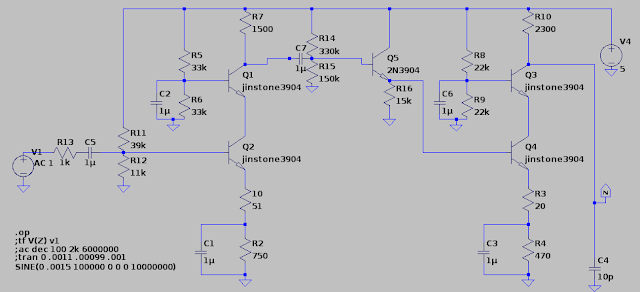
Again, my final design from before.
That magical feeling of meeting spec because your sim spec is way bigger!
P.S. it also took 5mW power. SO PROUD :D

Lab 3/Final Design Project:

For our final project we had to design a transimpedance amplifier (which is NOT an op amp). The cool thing about transimpedance amps is that their gain and bandwidth are decoupled! You can set them individually, which you can't in an op amp! Also they have no slew rate limit because you supply your own current input! Hence, they are super hella-fast. However, because they're low-impedance input & high-impedance output, you can't do nice things like integrators, differentiators, etc. 

You can't have everything in life. Boo. 

For the circuit, we were pretty much given an outline beforehand. 


Specs were:


Now the main deal about the design project was that you could either build it or write a project. I was obviously going to go for build (hence a nice thing about this post is that I remember what I did) :P

The whole diamond circuit buffer input we were given, so we couldn't change that, and we were told to bias it at 1mA. The main things we could pick were the mirrors and our output buffer. 

There were a few subtle things about this amplifier. First off, normal current mirrors don't have a high enough output impedance to provide a 200k node at DC. You have to use something else, so I picked Wilson mirrors. There were weird things about them though... 

Final Transimpedance Amp

First off, if you used a modified Wilson on the bottom NPN current mirror, it brought the open loop DC output bias from 13V to 3V. I think this had to do with transistor matching because the PNPs and NPNs were pretty unbalanced in not only the 301 models, but also ltspice's default ones (I sim'ed them in both because I got confused over some of these irregularities). A better way to get rid of these mirror discrepancies is to use emitter degeneration (which I didn't) to match them better (because closed loop testing hides your sins). 

Also, the output resistances of the Wilson mirrors were beta*R_out. Normally, these should be (beta*R_out)/2. I still am not quite sure why that occurred. I'm guessing that because they attach onto the original diamond, the left branches of the mirrors are technically stacks of 2 or 3 transistors, so the overall output of the mirrors are beta*R_out. This is just my intuitive guess though... 

Another thing I did was make the output buffer not a kosher diamond circuit. The obvious thing (since you were already given a diamond to begin with) is to stick another diamond at the end since it is a +1 buffer. However, the output buffer circuit I used consumes less power, forces Q9 and Q10 to never saturate, and bootstraps those transistors as well. A word of caution though - you can't use the output buffer as a replacement for the input diamond circuit. This is because the input and output are tied together (hence you get some bootstrapping and V_ce = ~.6V). When you use a buffer as the input for your transimpedance amp, you take the normal "output" and the normal "input" and use them both as inputs so you can get at least one low-impedance node. 


Now, the problem is that because your "input" and "output" are tied in the last stage's buffer, I feel that you're going to get weird, coupled problems if you use that buffer topology as an input. It's perfectly fine as an output though, because you leave its "output" alone. When you couple them together, you might get a weird V_be offset from +Input to -Input as well. Since this would be placed in the very inputs of your overall amplifier, even in closed loop, that offset would be amplified through the whole system and show up on your output. Gross :( 

Also, one last thing about the transimpedance amp is that I could've used better current sources. Every .6V you put across one V_be leg for a mirror, the other leg outputs 10x as much current. Hence you can save power by having one leg be 0.1mA and the other be 1mA. I did this with resistors, but you could do it another way. You also don't need 1mA to bias your buffers (you can cheat power with less and it'll still be fine). 

Here's my super cute hipstergram of my transimpedance amp :P

Analog Hipster

I deadbugged the main "compensation"-esque capacitor from the mirrors to the output buffer to maximize my bandwidth. I also used fingernail polish to paint my PNPs (pink) and NPNs (blue) so I wouldn't go insane! I even put the numbers of my transistors from my spice model so I could easily debug if needed, but luckily enough, it worked the first time :D YAAAAAAAAAAAAAAY

MAGIC

Phew! 

Well, that document's this year's transition into beardy-weirdiness. I feel like this is sort of an abrupt ending, but oh well. Hopefully I'll have another long rant to give you all next semester. 

Toddles,
Jordan


Monday, June 4, 2012

NEVER Build a Quadrotor for 6.115

Don't ever program a quadrotor in assembly, or for that matter try to build one with an 8051 core unless are: 1) a wizard or 2) have a chip which runs a couple of MIPS, has loads of memory, more than one UART/SPI/I2C, an onboard boot loader, and isn't larger than your quadrotor. Even then, you still might hate yourself.
(P. S. It's a bad sign if your processor is older than you...)

Also don't buy a (surprise! ratiometric) analog IMU because you wanted to skip I2C, JUST LEARN I2C.

Me on the outside
Me on the inside.
Unfortunately, for my Microcontroller Class (6.115), I stupidly (well, rather naively), decided that making a quadrotor for a final project would be cool. And then I stupidly decided to change Babycopter (my originally "analog-esque" quadrotor) to digital because I'm an idiot (to be fair, it would've been hard in analog too).

*sigh* Sometimes I make such HORRIBLE decisions.

So my lovely, adorable, sweet quadrotor turned into a SOFTWARE NIGHTMARE, but before we get to that part, let's start out with what I like best - hardware.

Analog PD controller:
Gross but at least easy to tweak.
True, doing all the analog controls ever wasn't going to be pretty but hey, they make quad op amp packages. Also yeah, those high-passes freaked the crap out of me, but I kinda prayed and hoped and then ran into a piece of knowledge that basically made me switch to digital.

The AT89C2051 hasn't a DAC or an ADC and to implement them would require a lot of (unavailable) space. What kind of freaking chip doesn't have a DAC or ADC onboard?

Oh yeah, one that's 5 billion years old.

For those of you who don't know, 6.115's final project requirements are that you have to have some assembly-written program on some 8051 core, of which you have available either a real 8051, or you have free at89c2051s. You also get about 3-4 weeks to do it. To be honest, the assembly part isn't what breaks my soul; it's the goddamn 30 year old processor. There's a reason why quadrotors weren't common in the 80s...

Anyway, most people make something that uses the 6.115 kit (which has a signal generator, power supply, breadboard space, etc), but I again (naively) decided to make things harder than necessary. You can't make a quadrotor with the kit (it's like 20 pounds) and bringing a wire really is too messy, so I made my own PCB boards.

Here are all the versions of my control boards and why they all failed (to some degree). See, real engineering is an iterative process...


Version 1: 

Problems: ADC can't collect values properly because P1 must be completely set high before any read, which wouldn't work if you're also trying to use those pins to select values with a multiplexer... Also I labeled "yaw" as "raw"? Plus, it was a lot of chips. Luckily I never routed this board. 

Version 2:

Problems: Close but no cigar. Bit-banging two 2051s got into a lot of trouble with framing errors. Less chips though. I did route this sucker, only to spend hours trying to fix bit-banging which really wasn't going to be a happy at my baud rate. If I had more time, I would've done SPI, but I had about 4 days left...


Well, more routing practice I guess. Did I mention I hate bit-banging?

Version 3:

Problems: At this point in time I only had a few days before demos, and I was about to die from lack of sleep, so I drew a rough version of this circuit by hand and my lovely boyfriend Joe made the schematics/routed it up for me as I slept for the first time in 2 and a half days. Also this is done in some hipster open-source layout program called KiCAD. Don't grow up to be Richard Stallman. I'll never forgive you. <3


Again, routed in KiCAD,  ended up kinda working. 

For both boards, I etched PCB versions of them (pretty fast process, like under an hour). But hardware is hardware and usually debug-able on my part. I think the only real issue I had with any of my hardware is checking which P1 pins on the 2051 were pull-ups, oh and also dragging the reset line first high then low with a cap (can't leave it floating). 

;---------------------------------------------------------------------------------------------------------------------------------

NOW THE SOFTWARE NIGHTMARE BEGINS:

PEOPLE WHO WRITE MATH LIBRARIES ARE MAGIC.

Honestly! I think I must've written 3 PD programs each over 1000 lines of assembly and each dangerously close to the 2K bytes of flash on the damn chip. In fact, several times I thought I had run overboard when my compiled hex file was over 2K, but luckily you can find out how much memory your program actually takes by reading the hex file.

I'm going to write how to read your hex file as it's probably good in case some poor 6.115 student stumbles on this post. This is an excerpt from a chat where I learned how to decode this crap. Oh yeah, read the Wikipedia page on Intel Hex Format.


So every line is going to start like this
  :AABBBBCCDDblaaaaaaaaaaaaaaaaaaaaaaahhhhh
1:04 AM BBBB is the starting address of where to start program
  AA is how many bytes to program
  CC is 00 if it's supposed to actually do programming at that location. If CC is 01 (the only case rasm ever produces this is at the very, very last line of the OBJ file), then it means that this is the end of the file
  So:
1:05 AM 1. Try to find the highest BBBB that you can
  2. Add AA to BBBB
  that's the number of bytes you program
  3. Make sure that BBBB isn't repeated anywhere else


Luckily, if you haven't overwritten any of your previous program, you'll find this all in the second to last line of your hex file. For example, on the wiki file:


:10010000214601360121470136007EFE09D2190140
:100110002146017EB7C20001FF5F16002148011988
:10012000194E79234623965778239EDA3F01B2CAA7
:100130003F0156702B5E712B722B732146013421C7
:00000001FF


The number of bytes would be 0x0130 + 0x10 = 320 bytes (304 + 16)

This saved me from several panic attacks.

Next, in my rant of a post, there were all the math libraries where I basically wasted a lot of time -_-

First I tried fixed point, which is actually nice to some degree except I kept using 8.8 bit math, which didn't have enough resolution. Also AH WHY CAN'T I HAVE NEGATIVE NUMBERS? ALSO WHY DOES EVERYTHING OVERFLOW SOMETIMES????

Basically that wasn't fun, but if you want there's a nice tutorial on 16 bit math (which is really all that it was) on the 8052 website. Here's also my fixed point library (in C, you can decompile it into assembly if you'd like). Also, here's a wonderful 8051 emulator that you can test out all your math on! You can even see on which instructions it messes up! Yaaaaaaaaaaaaaaaaaaaaaaay!

However, due to the lack of negatives and 8 bit not having enough resolution, I ended up switching to signed integer, which would've killed me had it not been for this beautiful signed integer library (note, you must view source of the html to see it).

WILLIAM MARSHALL, CREATOR OF THIS LIBRARY, I DON'T KNOW WHO YOU ARE OR WHERE YOU COME FROM, BUT I'LL BUY YOU A DRINK IF WE EVER MEET. THANK YOU FOR EVERYTHING. XOXO JORDAN.

That library basically saved my butt. True, it has some issues. It takes a million machine cycles to do anything, but if you read through the programs, you can optimize them quite a bit yourself. Also you have to change the flag bits to PSW flags because we have no dbit command with Rasm (our assembly compiler). Whatever, still baller.

However, this did increase the size/machine cycles of everything, which meant in the end, I could only perform the D math reliably. Running on a 24 MHz crystal with a control loop of 100 Hz, I only had 20K machine cycles. And while you'd think this would be enough, for loads of math, it's really not. If you ever do attempt this, get a micro running a few MIPS, because you need that much speed.

Oh, but then of course I would run into communication problems!

;---------------------------------------------------------------------------------------------------------------------------------

COMMUNICATION NIGHTMARE:

Ahem, before I start, I should get this rant out of the way.

THERE ARE VERY SPECIFIC INTERRUPT FLAGS WHICH NEED TO BE SET FOR RELIABLE SERIAL WITH THE AT89C2051. YOU WON'T FIND THEM ON THE DATASHEET BECAUSE ATMEL PUT THEM IN SOME OBSCURE APPLICATION NOTE FILE WHICH YOU WON'T FIND UNTIL YOU GIVE UP ON ASSEMBLY AND LOOK AT WHAT PEOPLE WROTE IN C BECAUSE YOU HATE ASSEMBLY. ALSO BIT-BANGING CAN BE SUPER SKETCHY.

Least for UART. I probably should've done SPI, but I ran out of time for this project, and I already had to even push my baud rate to be fast enough. At 9600, each bit is 104 microseconds. For my IMU, I was sending packets of 12 bytes with a control loop of 100 Hz. For me to have sufficiently sent one packet (not counting how long the math was or having to again receive it), it would've taken 12*8*1/9600 = 0.01 seconds, the same period as my overall control loop.

So I made the baud rate faster to 31250, then tried this serial bit-bang code. Unforunately, it doesn't hold well over 9600, and you start to get framing errors. Oh, make sure you don't accidentally full-duplex your UART either, or else it will give you absolute garbage.

At the end of the day, I really couldn't Xbee UART my 2051 and bit-bang my IMU/second 2051. I started panicking and freaking out until I figured out a somewhat passable solution - do what you know will work.

ARDUINO

I really, really, really love Arduino. WHEN ALL ELSE FAILS IN LIFE, ARDUINO IS YOUR BEST FRIEND. Arduino only has one UART, but also a software serial library (bit-bang) which was more reliable than the one I had, so I made do.

Of course, it wasn't perfect. After a while, I would start to lose about 1/4 to 1/3 of all my packets from my 2051 (checksums are your BFFLs), but if you fly your quadrotor steadily, hopefully you won't have frequent changes.

What I ended up doing was having my P math in Arduino, and having my D math/sensor zero-ing in 2051, which really wasn't terribly good, and then fed all that 2051 crap back into Arduino which sent servo pulses to my motors.

Here's my extremely tired/exasperated video from checkoff day. Babycopter derps at flying the first 2 times, but kinda manages the 3rd. Also I look like a motorcycle punk lol.


But yeah, it flew enough to the point where I was somewhat happy. Hmm, that was also when I crappily tuned my PD the night before... clearly that wasn't optimized yet. Oops.

Anyway, here's the lesson learned. Sometimes, life really sucks because you bit off more than you can chew, but you've got 2 options: 1) spit it out, 2) keep chewing. Clearly I belong in the later class of masochists, but oh well. When push comes to shove and your project looks like it's about to die several times in hell, don't panic (for a long amount of time). Calm down, paint your nails, and look up what people have done on the internet. You might have to give yourself 3 manicures a day for two weeks, but at least you're not paralyzed with fear. Just remember not to stress yourself out the next time.

Oh, and don't forget: NEVER EVER EVER build a quadrotor for 6.115